

Most businesses have an issue with WhatsApp, but they just haven’t named it yet.
Their sales team is making calls, having conversations, building rapport, all on WhatsApp. And your CRM is sitting there logging absolutely none of it. No record of who called who. No context from the last conversation. No follow-up task. Just a clean, empty lead record that looks like nothing ever happened.
That’s not a problem happening because of people. That’s a problem with the tools currently used.
When WhatsApp voice calling and CRM systems operate as two separate worlds, a business loses more than just call logs. It loses visibility into the sales pipeline along with context that could have closed a deal.
As someone in a managerial position, you lose the ability to manage a sales team on anything other than gut feel and verbal updates.
The fix isn’t complicated. It’s just connecting the two so every WhatsApp call your team makes happens inside the CRM, gets logged automatically, and actually contributes to the sales process instead of disappearing into someone’s phone.
That’s what WhatsApp calling CRM integration does. And if your team is serious about increasing ROI, it’s no longer optional.
The WhatsApp Problem Nobody Talks About
WhatsApp has become the default channel for business conversations, especially in markets across Asia, the Middle East, and increasingly everywhere else.
Prospects respond faster on WhatsApp than email or SMS. Deals get discussed there. Objections get handled there. Relationships get built there.
But most CRMs were built before WA became this central to sales. So, what exactly happens in practice?
Your sales reps are juggling two worlds. WhatsApp on their phone. Salesforce on their laptop. Every call they make on WhatsApp is a call your CRM never sees.
Consequently, such problems stack up fast:
- Lost context: A rep picks up a WhatsApp call from a lead mid-day. No CRM open. No customer history visible. They’re flying blind, trying to remember details from three conversations ago while also trying to sound confident and close the deal. Failing to do so, they are required to ask questions, and the customer gets frustrated by answering repetitive questions.
- Zero visibility for managers: You can see call logs in Salesforce. But WhatsApp calls? Invisible. You have no idea how many calls are being made, what’s being discussed, or why certain leads are going cold. You’re managing a sales team with half the data. CRM voice communication solution that takes care of all WA calls via a single dashboard can eradicate low visibility completely from the workflows.
- Manual logging that never happens: Every salesperson means to update the CRM after a call. But another lead comes in, another task takes priority, and the update gets missed. Over time, that creates gaps in customer records and makes reporting inaccurate.
- App switching that kills momentum: Open WhatsApp. Make the call. Switch to Salesforce. Find the contact. Update the notes. Switch back. Repeat forty times a day. It sounds manageable until you realize how much time and mental energy it quietly burns through.
What WhatsApp Calling CRM Integration Actually Means?
With strategic assistance of this powerful integration, instead of WhatsApp and Salesforce living in separate worlds, they work together in one place.
Your sales rep opens Salesforce, finds a lead, and makes a WhatsApp voice call directly from inside the CRM. One click. No switching. No separate app.
The call happens. The CRM watches. Everything gets logged automatically with details about the caller, duration, and complete context.
That’s the core of WhatsApp calling CRM integration. Not a complicated concept. Just a missing connection that, once you have it, makes you wonder how you managed without it.
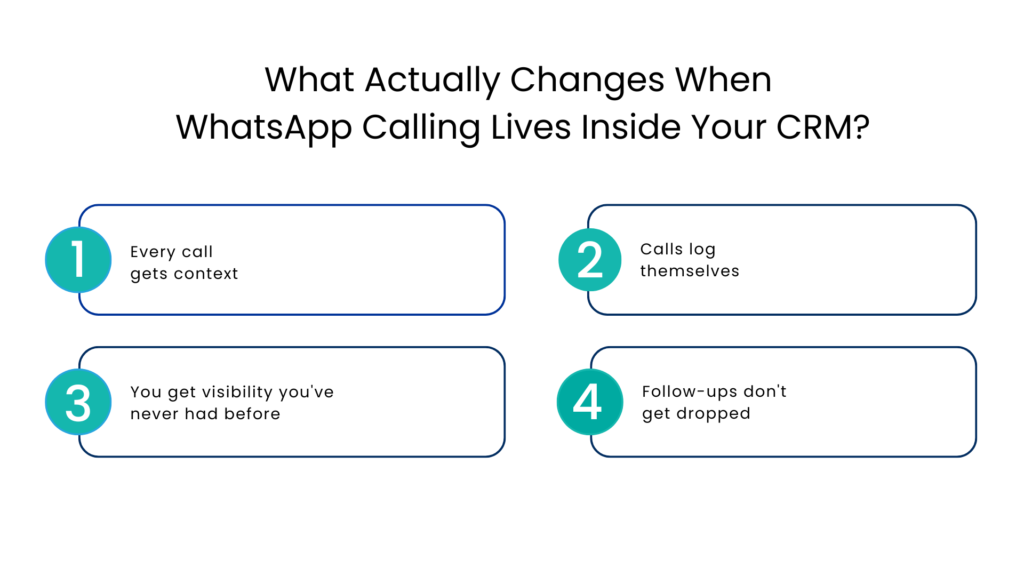
What Actually Changes When WhatsApp Calling Lives Inside Your CRM?
This is where it gets interesting for a business owner. The shift isn’t just about convenience for your reps. The strategic alliance of Whatsapp calling and CRM changes what you can see, measure, and act on as a leader.
Every call gets context
When a rep makes a WhatsApp call through Salesforce, the customer’s full history is right there with past conversations, deal stage, notes from previous calls. They’re not guessing things anymore. They’re now interacting with full information right there in front of them. More context, more convenience, and more conversions.
Calls log themselves
No manual entry. No forgotten updates. The moment a call ends, it’s already there inside the CRM. Duration, timestamp, outcome, all there without anyone having to remember to type it in manually.
You get visibility you’ve never had before
How many WhatsApp calls did your team make this week? Which leads got called and which ones didn’t? Which reps are most active? You can actually answer these questions because the data exists in the dashboard already.
Whenever there is a need to make decisions, relying on guesswork does not enter the picture anymore. Now, you take decisions backed by data.
Follow-ups don’t get dropped
Workflows can be triggered the moment a call ends. A task gets created. A follow-up message goes out. A lead status updates itself. The CRM starts working for you instead of waiting for someone to update it manually.
Features That Make WhatsApp Calling in CRM a Game changing Solution
Not every WhatsApp Telephony integration is built the same. Here’s what genuinely moves the needle for sales teams:
One-click calling:
Your rep shouldn’t have to leave Salesforce, open WhatsApp, find the contact, and dial. One click from the CRM and the call starts. It is that simple.
AI-powered call summaries:
After a 15-minute call, nobody wants to write a summary and even if they write it, there is a lot of room for error.
AI does that automatically for you by writing key points, action items, and what the prospect said. Searchable and stored against the lead record.
Live call transcription:
Every word of the conversation is converted to text in real time. Useful for training, compliance, dispute resolution, and just “knowing” what was actually said.
Call recording:
One tap to record. Access it anytime. Managers can review calls without micromanaging reps. New team members can learn from real conversations.
Call transfer and merge:
Need to bring in a senior closer mid-call? Agents can transfer without hanging up. Want to loop in a technical expert? Merge the call. No awkward “let me call you back with someone else.”
Communicat-O brings all of this natively into Salesforce, so your team gets full WhatsApp voice calling capabilities without ever leaving their CRM. One platform. Full context. Every call tracked.
Conclusion
In this modern AI-led era, WhatsApp is much more than just a messaging app. For many companies, it has become one of the main sales conversation channels where initial interactions take place, continue evolving, and finally result in sales being closed.
The point is not about whether your salespeople use WhatsApp in their everyday work. Most likely, they already do it. The question rather is whether the conversations and calls from WhatsApp find their way into your CRM system and are properly tracked there.
The sad news is, for many companies, the answer is negative. This communication channel versus your CRM system is precisely what makes it possible to miss out on great business opportunities.
WhatsApp Salesforce voice and chat integration system is designed to fill this gap.
Every single interaction will be recorded and included in the sales process workflow without causing you any extra trouble. To learn more about WhatsApp calling in Salesforce, check Communicat-O and schedule a demo.
FAQs
What is WhatsApp calling CRM integration?
It’s a direct connection between WhatsApp’s voice calling feature and your CRM, so sales teams can make and receive WhatsApp calls from inside the CRM, with every call automatically logged, recorded, and tied to the right contact.
Do call recordings and transcripts store automatically in the CRM?
Yes. Recordings and AI-generated transcripts are automatically saved against the lead or contact record in Salesforce. No manual uploads, no separate storage, and no hassle of manual work.
Is WhatsApp calling CRM solution by Communicat-O useful for remote or field sales teams?
Absolutely. Because it works on mobile too, field reps can make CRM-connected WhatsApp calls from anywhere and everything still logs back to Salesforce automatically.
What’s the difference between WhatsApp messaging integration and WhatsApp calling integration?
Messaging integration lets you send and receive texts within your CRM. Calling integration adds voice so you can make actual phone calls via WhatsApp, with all the same logging, recording, and context benefits. Communicat-O supports both.
For more insights, updates, and expert tips, follow us on LinkedIn.