

A customer’s journey rarely happens on one channel. They find a product through search, ask a quick question on WhatsApp, talk to a sales rep, wait for a follow-up, then reach out to support months later. Each of these moments generates information. The problem is that most of it never reaches the next person who needs it.
An All-in-one WhatsApp CRM changes that by connecting every WhatsApp conversation to the customer record behind it. When messaging and customer data live in the same system, a business can respond to what a customer actually needs at that moment, not just send a generic reply. This article looks at how to build those workflows in practice, stage by stage.
Start With the Customer Event, Not the Message
Most WhatsApp bots fail in their mission because they begin by asking themselves about the message, which means, “What should we say?” A better place to start would be the customer’s trigger, asking, “What happened?”
CRM events that make good workflow triggers include:
- A new lead entering the system
- A product inquiry or pricing request
- A demo or consultation booking
- A completed purchase
- A support ticket being raised
- A follow-up that was never completed
- A customer who has gone quiet after previous activity
Each of these is a moment where the customer is actively waiting on something. When CRM data can fire a WhatsApp message automatically the moment one of these events happens, the business stops chasing conversations and starts responding to them in real time.
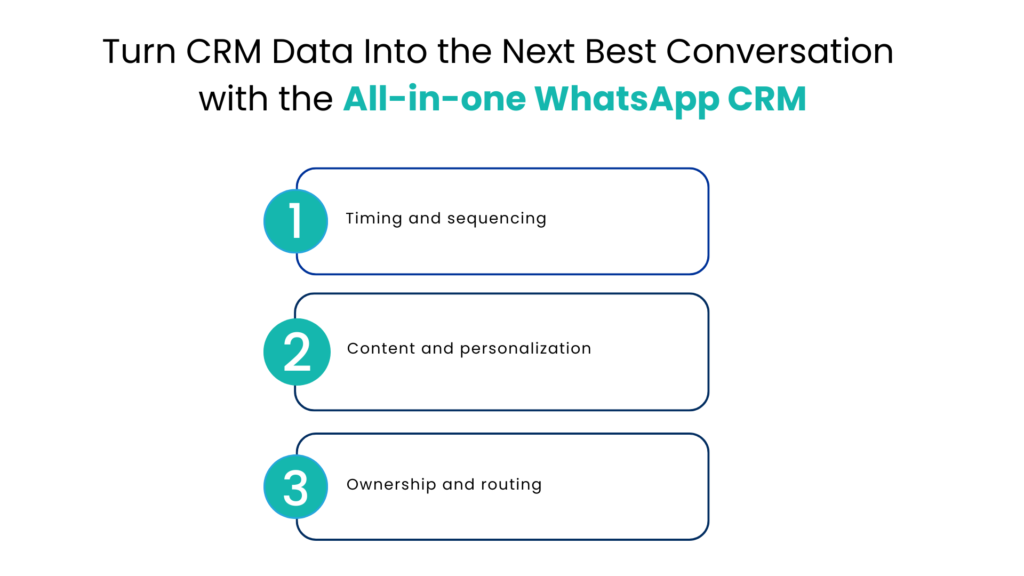
Turn CRM Data into the Next Best Conversation with the All-in-one WhatsApp CRM
Every customer does not have to receive the same information. A new customer looking for pricing information is in a different position from an existing customer who wants to know more about renewals.
WhatsApp CRM data can shape several parts of a WhatsApp conversation:
Timing and sequencing
A lead captured five minutes ago needs a quick acknowledgment, not a sales pitch. A customer who booked a demo for next Tuesday needs a reminder, not a cold outreach message.
Content and personalization
Data fields that are already present within the CRM, like an individual’s interest in certain products, purchase history, or type of service subscription, could be used to craft a personalized message for the customer. It is this feature that is the most valuable in WhatsApp business integration CRM systems, as the message appears to have been written just for one particular individual.
Ownership and routing
Ownership settings for the all-in-one WhatsApp CRM will determine who the sales or support representative should be for a particular conversation without having to reassign chats manually.
Four Customer Moments Worth Automating
Rather than automating everything, it helps to focus on the moments that repeat often and follow a predictable pattern. Four examples come up in almost every business:
New lead capture
A lead fills out a form or messages the business first. The CRM logs the lead, a WhatsApp welcome message goes out within minutes, the lead gets assigned to a rep, and a follow-up is scheduled automatically if there’s no reply within a set window.
Demo or appointment journey
A demo gets booked. The CRM triggers a confirmation message, a reminder closer to the time, and a short WhatsApp check-in after the demo to gather feedback and plan next steps.
Support conversation
A customer sends a question. An automated reply handles common queries immediately, and anything more complex gets routed to the right agent, with the customer’s account history visible the moment the agent picks it up.
Follow-up after the purchase
The order is registered in the CRM system. The client receives confirmation and an update on the progress of the order and, finally, gets asked if he needs any assistance or considers buying from the same store again.
None of these examples has to be too complex; they just have to be linked to the initial CRM event.
Know When a Human Should Take the Conversation
Automation should handle repetition, not judgment. Some conversations need a person immediately:
- Complaints or dissatisfaction
- High-value prospects close to a decision
- Requests that need specialist product knowledge
- Anything sensitive to the customer’s account or billing
The handoff itself becomes equally important as the decision to hand off. When the new agent takes control of the conversation, they need to be aware of the entire conversation prior to it, and not just the last thing said. The failure to do this will probably frustrate the customer immediately.
Keep the Full Journey Visible Inside the CRM
Every WhatsApp conversation should live on the customer’s record, not in a separate messaging app that only one person checks. This matters for a few reasons:
- Sales and support see the same history. Nobody has to ask a customer to repeat themselves.
- Managers get real visibility. Response times, open conversations, and follow-up gaps are tracked in one place.
- Reporting reflects reality. Conversion and retention numbers can be tied back to actual conversations, not guesswork.
This is another situation where Salesforce is an obvious choice because it already houses the customer record for the WhatsApp conversation to connect with. Comparing WhatsApp Integration CRM Solutions requires you to ensure whether the conversation connects automatically to the record or if there is some manual logging done after the conversation. Manual logging fails to work when the volume gets high.
Measure the Journey, Not Just the Message
Open rates and reply counts are easy to track, but they don’t tell you whether the journey is actually working. It helps to measure each stage separately:
| Journey Stage | What to Measure |
| Lead capture | Time to first response |
| First conversation | Engagement rate |
| Follow-up | Reply rate |
| Sales journey | Conversion rate |
| Support | Resolution time |
| Post-purchase | Repeat engagement |
If there is a fast initial response but low conversions, then there is most likely an issue with the offer or message rather than a speed issue. If there is a slow initial response but high engagement after contacting someone, then there is a delay in the trigger within the workflow.
Consumer research backs up why this stage-by-stage view matters. In a global survey commissioned by Meta, nearly three-quarters of consumers said they are more likely to buy from brands that offer messaging as a channel, which means a weak early-stage experience has a direct cost, not just an inconvenience.
A Quick Example: Real Estate Inquiry to Conversion
Consider a real estate business as an example. A prospective buyer messages a listing number on WhatsApp after seeing it online.
1. The inquiry creates a lead record in the CRM automatically.
2. A personalized WhatsApp reply goes out with the property details and next available viewing slots, pulled from the CRM.
3. The lead answers a couple of qualifying questions inside the same chat.
4. Based on budget and location preference, the CRM assigns the lead to the right agent.
5. The agent follows up on WhatsApp, and every message from the original inquiry onward is visible in one thread.
6. If the buyer goes quiet, a follow-up triggers automatically after a set number of days.
Nothing here required the buyer to repeat information or switch channels. The CRM record and the conversation moved together.
This kind of setup depends on the two systems working as one. When teams look at connecting WhatsApp conversations directly with Salesforce, the goal isn’t just messaging convenience. It’s making sure the customer record and the conversation never fall out of sync. For sales teams that also want to speak with leads directly, WhatsApp calling built into the same workflow means a rep can move from chat to a call without leaving the CRM or losing the conversation thread.
Research carried out by Salesforce into the expectations of their customers gives reasons for the need to personalize at such an extent. In fact, 73 percent of customers now feel that businesses treat them as individuals and not as numbers, compared to previous years where this was only 50 percent. One effective method of ensuring you meet these expectations is through having a connected WhatsApp CRM software system.
Conclusion
An all-in-one WhatsApp CRM setup isn’t really about messaging faster. It’s about making sure every interaction carries the context of everything that came before it, so customers stop repeating themselves and teams stop guessing what to say next.
Begin with the simple task: Choose an event for one of your customers and link it to a WhatsApp process. When you have reached a point where you want to find out how a properly developed CRM for WhatsApp Integration would perform with your own customer journey, then you should look at an integration of Salesforce and WhatsApp designed specifically for this purpose.
FAQs
Is Salesforce the only platform on which I can integrate WhatsApp with CRM?
No, the same workflow logic applies to most modern CRMs. It’s just that Salesforce is used most commonly for the purposes of sales and support. So, Salesforce provides a good example of how CRM activities can be integrated with WhatsApp communications.
How much of the customer journey can be automated?
You can automate everything that can be predicted in advance – acknowledgements, reminders, updates and follow-ups. The exceptions would be the things which require personal attention – complaints and judgmental communication.
What is the difference between basic WhatsApp CRM and All-in-one WhatsApp CRM?
Basic integration would provide you with simple functionality which allows sending and receiving messages within your CRM tool. The All-in-one WhatsApp CRM would allow you to integrate messaging with workflow triggers, customer info, routing and reporting.
Is it feasible for small teams to manage WhatsApp workflow triggered by CRM?
Yes. Begin by identifying one or two very active points, such as greeting of new leads or appointment reminders, and automate the entire process later. Most small teams earn back their costs on these first workflows within weeks.
For more insights, updates, and expert tips, follow us on LinkedIn.