Communicat-O: a CRM on Salesforce, with no Salesforce licence to buy
30 November 20265 min read
On this page
Communicat-O now comes with its own CRM, built on Salesforce. You get a WhatsApp CRM without Salesforce licences to buy, so your customer records, conversations and team sit in one place.
Your customers already message you on WhatsApp. Now your team can handle those chats in a real CRM, without paying for Salesforce licences.
The problem with running customer conversations on WhatsApp
For many businesses in India and Southeast Asia, WhatsApp is where sales and support happen. The trouble starts when that work lives on personal phones.
- Chats are scattered. A quote sits on one person's phone, a reply on another's, and the rest in a spreadsheet.
- History leaves with people. When an employee leaves, their customer chats leave with them.
- Managers can't see the whole picture. It is hard to know what each customer has been told.
- Basic apps only send messages. They connect you to customers, but they don't keep a proper customer record.
Teams need more than messaging. They need organised customer records and shared visibility. Many also want a proper CRM, but see Salesforce as too big or too expensive for them.
What Communicat-O brings together
Communicat-O puts messaging, a CRM, marketing automation and team collaboration in one place. Your marketing, sales and support teams all work from the same customer information.
You can connect twelve channels: WhatsApp, Instagram, Messenger, Telegram, LINE, Viber, Zalo, WeChat, WeCom, SMS, RCS for Business and Web Chat. Each one connects through your own account. If most of your customers are on WhatsApp, start with WhatsApp.
Every reply lands in the shared inbox, linked to the customer's record. Each contact also carries opt-in and opt-out details, so your team knows who has agreed to hear from you.
A real CRM underneath, built on Salesforce
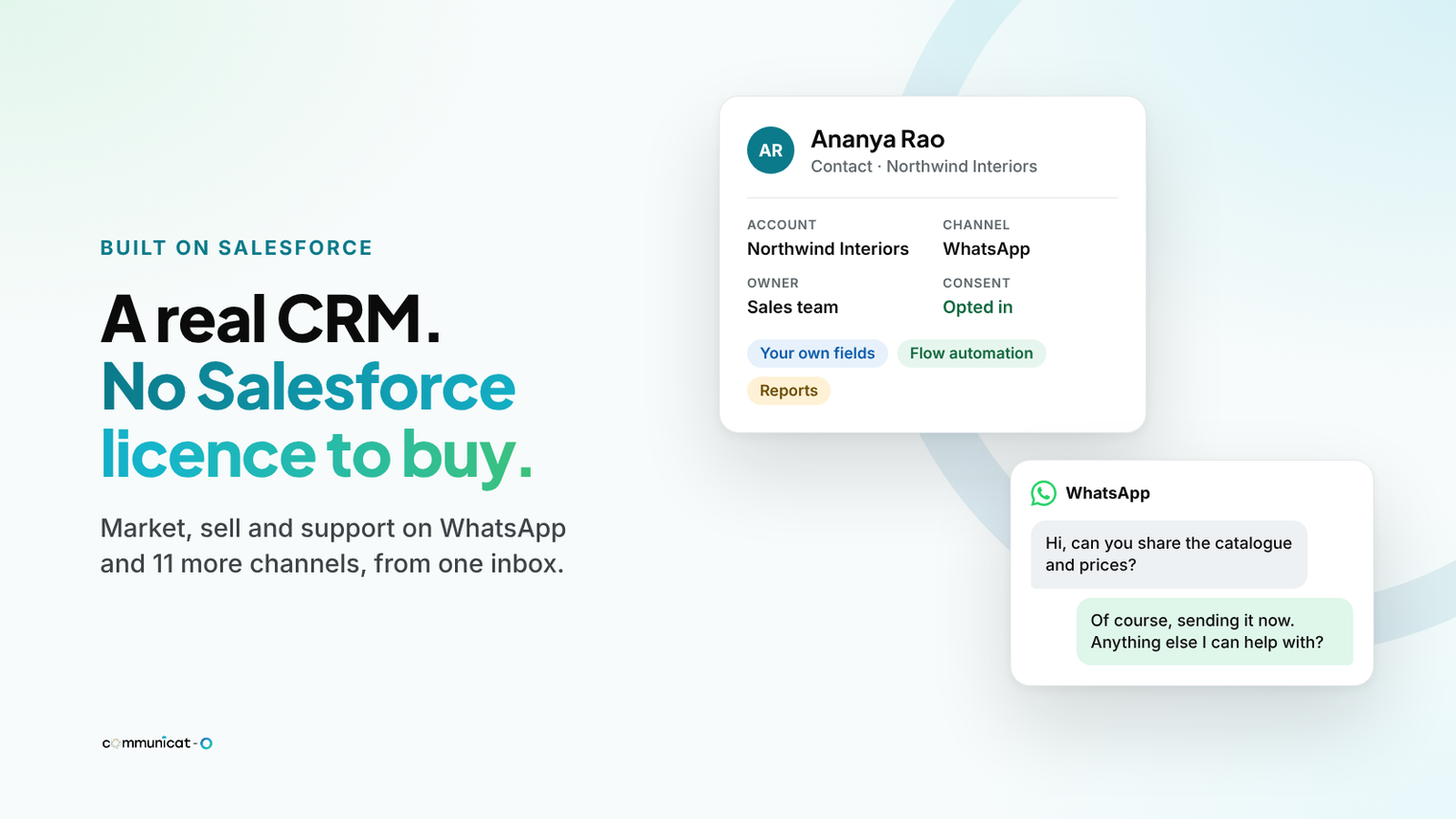
This is what sets Communicat-O apart. Every customer gets their own Salesforce workspace. Communicat-O is built around contacts and accounts.
Inside your workspace, you can:
- add your own fields to match how you describe your customers
- automate work with Salesforce Flow
- build your own reports and dashboards
- rely on Salesforce's security and permissions, which come with the platform.
The Salesforce platform comes with Communicat-O, so you get an enterprise-grade CRM underneath your conversations without buying a Salesforce licence. As you grow, you add fields, automations and reports to fit the way you work.
Communicat-O is a Salesforce ISV and OEM partner, and the Salesforce platform is certified to ISO 27001 and SOC 2.
Want the detail on how licensing works? Read Do I need a Salesforce licence?
One inbox for marketing, sales and support
The shared team inbox gives everyone one place to work:
- Queues and assignment rules decide which team gets a new chat.
- Round-robin assignment shares chats evenly across your agents.
- Skills-based routing sends each chat to someone who can answer it.
- Internal notes let one agent leave context for the next.
- Saved replies speed up answers to common questions.
- Response timers keep conversations moving.
Conversations belong to the team, not to one person's phone. When someone leaves, the history stays on the customer's record, and the next person picks up where they stopped. Agents can also work from the Salesforce mobile app.
Marketing and follow-ups with EngageX
EngageX is the automation tool inside Communicat-O. With it, you can:
- send broadcasts and approved templates to a chosen list of opted-in contacts, now, at a set time or on a repeat
- build follow-up sequences that send the next message after a wait
- build bots and customer journeys without code
- start conversations from click-to-WhatsApp ads
- start conversations from Instagram and Facebook comments, where a keyword in a comment sends an automatic private reply.
A simple follow-up sequence
Say someone enquires about your service. A follow-up sequence could run like this:
- Day 1: a welcome message with the details they asked for.
- Day 3: a short follow-up asking if they have questions.
- Day 7: a final reminder with a clear next step.
Each reply arrives in the shared inbox, on the customer's record, so your team can step in at any point. EngageX is included in every plan, with no limit on bot runs.
Add agentic AI with mAI
When you want AI to take on more of the routine work, add mAI, Communicat-O's AI agent. mAI is a paid add-on. It is separate from EngageX, which every plan includes.
mAI can:
- reply to customers on its own
- answer from your own knowledge base
- hand the chat to a person, with a summary
- suggest replies to your agents
- summarise conversations.
Routine questions get answered straight away, and your team takes over with the context it needs.
Already using Salesforce?
If your organisation already runs Salesforce, look at Communicat-O for Salesforce. It works inside your own Salesforce org, with conversations saved on your own records.
The difference is simple. Communicat-O gives you a Salesforce workspace of your own, with no licence to buy. Communicat-O for Salesforce brings the same inbox into the org you already use.
Request a 14-day free trial
You can try Communicat-O before you commit.
- 14-day free trial, with no credit card needed, set up for you within one business day.
- Free onboarding to help you get started.
- Keep your WhatsApp number if you are switching from another provider.
- Nothing to set up twice. When you buy, your trial becomes your account.
Your plan and your messaging are paid for separately. Messaging runs on prepaid messaging credits, used the way each channel charges, at the channel's own cost plus a small fee. See the pricing plans for current details.
FAQs
What does Communicat-O include?
A shared team inbox for twelve channels, with a CRM for contacts and accounts built on Salesforce. You get your own workspace, with your own fields, Flow automation, reports and dashboards, and EngageX bots and journeys in every plan. There is no Salesforce licence to buy.
Can I add my own fields?
Yes. You can add your own fields in your workspace, and you can also build Flow automations, reports and dashboards.
Can my team use it on their phones?
Yes. Your agents can work from the Salesforce mobile app.
What happens to my trial when I buy?
Your trial becomes your account, so you don't set anything up again.
I already use Salesforce. Which edition is for me?
Communicat-O for Salesforce. It works inside your own Salesforce org, with conversations saved on your own records. Communicat-O is for teams that don't use Salesforce and want a CRM of their own, with no licence to buy.
For more insights, updates and expert tips, follow us on LinkedIn.
 Chat on WhatsApp