

In today’s hyper competitive and customer-centric world, businesses are under constant pressure to deliver fast, personalised and consistent customer experiences. Large enterprises with a huge customer base use a Salesforce CRM to maintain customer records. Most businesses tend to resolve 90% of the customer queries via a call.
Although, is it possible to attend to all the customers via a call and manage each and every incoming call? Unattended calls or disconnected resolutions lead to poor team performance, customer dissatisfaction, and loss of opportunities. This is where a salesforce CTI integration enters the picture.
Understanding the Meaning and Basics of CTI
CTI stands for Computer Telephony Integration and refers to the merging of telephonic calls with a computer GUI. This means that the sales agents can make and receive calls from a computer system without having to dial a number manually. This is beneficial for companies who are dealing with multiple call logs in a day and struggle to call manually.
But that is not it. A CTI offers more than just making and receiving calls. It allows the users to transfer calls, record calls, forward calls, monitor calls, merge calls, and identify the caller. It has been beneficial for the users and is seen to have increased productivity, efficiency, and customer service.
What is Salesforce CTI Integration?
Put in laymen terms, for organizations using a salesforce CRM, CTI integration is an added advantage. With CTI for salesforce integration the businesses can manage all their calls and call logs from within the salesforce CRM.
When companies use the salesforce CTI solution they can answer every phone call – incoming or outgoing without leaving the CRM. This saves the agents and sales reps hassle to log into a different application or program or even use a physical phone.
This CTI salesforce solution works like magic because the sales reps get the complete customer history in front of them including name, interaction history, notes and the tasks (if any) associated with that customer. This ensures that the sales reps are able to handle calls effectively with complete context of the customer history, eventually resolving the issues faster.
Capabilities of an Advanced CTI Integration with Salesforce
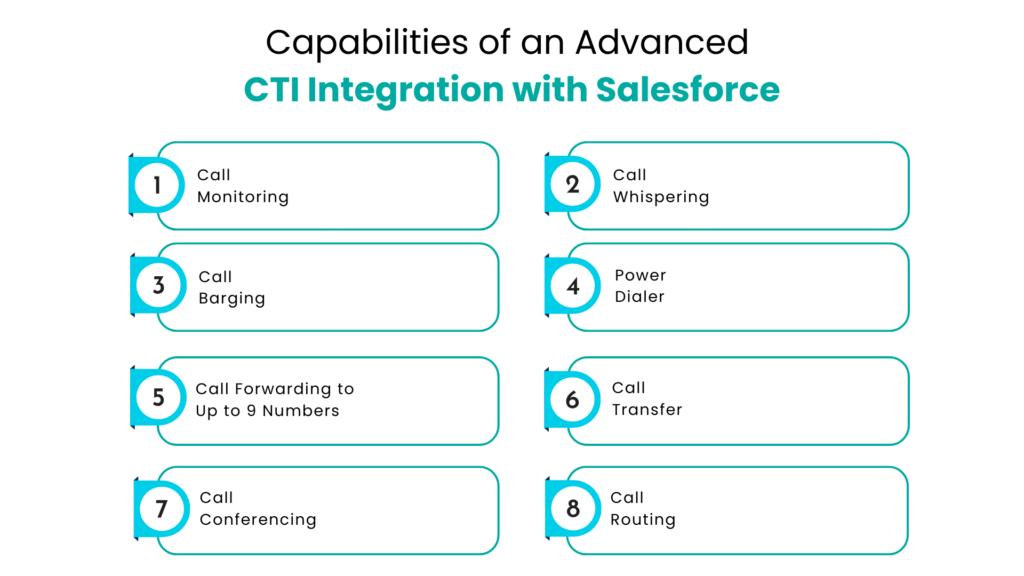
A salesforce CTI integration not only enables calls inside your salesforce CRM but also allows the teams and management to monitor or track every call, route calls, forward calls, transfer calls, or even make conference calls.This holistic call scenario within the salesforce CRM aids the businesses to resolve more number of queries at a single time and be more productive with the call dealings.
Call Monitoring
This feature allows supervisors to listen in on live calls as they happen. Managers can monitor how agents handle customer inquiries or concerns in real time, gaining immediate insight into communication quality and customer engagement. Call monitoring helps ensure service standards are consistently met and maintained.
Call Whispering
With CTI Integration in Salesforce Lightning, call whispering enables managers to provide real-time guidance to agents during live calls without the customer hearing the conversation. This allows supervisors to discreetly share advice, instructions, or key information to help agents manage calls more effectively.
Call Barging
Call barging allows managers to join an active call between an agent and a customer when intervention is required. Unlike whispering, both the agent and the customer can hear the manager, making it ideal for handling escalations, resolving issues quickly, or supporting complex conversations.
Power Dialer
A Power Dialer is a core CTI feature designed to significantly improve outbound calling efficiency for sales and support teams. It automatically dials through contact lists one number after another, eliminating the need for manual dialing.
By reducing downtime between calls, the Power Dialer allows agents to spend more time engaging with prospects or assisting customers. Automatic dialing minimizes errors associated with manual number entry while maximizing call productivity.
Call Forwarding to Up to 9 Numbers
This feature enables incoming calls to be forwarded to as many as nine different numbers simultaneously, ensuring no calls go unanswered. If the primary line is busy or unavailable, the call continues to ring across secondary and tertiary numbers until someone answers.
This advanced call-forwarding capability is especially valuable for professionals who must remain reachable at all times. By distributing incoming calls across multiple lines, businesses can improve responsiveness and prevent missed opportunities.
Call Transfer
Call transfer allows an active call to be seamlessly redirected to another extension, external number, or voicemail box. This is useful when the initial recipient is unable to address the caller’s needs and must route the call to a more appropriate team or specialist.
For example, a support agent may transfer a billing-related inquiry to the payments team, ensuring the caller receives accurate and timely assistance.
Call Conferencing
Call conferencing enables multiple participants to join a single call simultaneously. This feature supports collaboration by allowing users to add team members, stakeholders, or clients into one conversation. It is commonly used for team discussions, customer meetings, and situations that require real-time collaboration or shared decision-making.
Call Routing
Call routing directs incoming calls to the most appropriate destination based on predefined rules and conditions, ensuring efficient call handling and improved customer experience.
- Single User: Calls are routed to a specific individual based on availability or expertise.
- Group of Users: Calls are distributed among a designated team, such as sales or customer support, allowing any available agent to respond.
- Voicemail: Calls are routed to voicemail when agents are unavailable or outside business hours.
- IVR (Interactive Voice Response): Calls are directed through an automated menu system that guides callers to the right department or service.
- Last Communicator: Calls are routed back to the agent who last interacted with the caller, maintaining conversation continuity.
- Record Owner: In CRM-based routing, calls are forwarded to the owner of a specific Salesforce record, such as a lead or customer account.
How Does the Integration of Salesforce & CTI Benefit the Businesses in the Long Run?
With the integration of salesforce and CTI, the businesses are able to reap operational and productive benefits that help their sales agents to close more calls and reduce the call handling time as well. For business this means better output by agents and improved team efficiency.
Higher On-Call Success
CTI-enabled tools help teams achieve better call outcomes through enhanced training and coaching. Managers can observe live calls and provide real-time guidance, allowing agents to improve their skills during customer interactions. This hands-on support increases the likelihood that calls conclude with successful results.
Faster Sales Conversions
Accelerate your sales cycle with automated calling capabilities and instant access to caller information within Salesforce. With all relevant data displayed on a single screen, agents no longer need to switch between systems. This streamlined experience enables faster deal closures and improved collaboration across sales teams.
Fewer Missed Opportunities
CTI integration ensures that valuable opportunities are not overlooked. Calls can be forwarded to multiple numbers, increasing the chances of connecting with prospects. Seamless Salesforce integration also ensures that every lead and interaction is properly tracked and followed up.
Reduced Call Handling Time
CTI simplifies call management by streamlining routing, transfers, and conferencing. This allows agents to handle calls more efficiently, respond to inquiries faster, and reduce overall call duration without compromising service quality.
Improved Team Efficiency
Enhance collaboration and productivity with CTI communication tools. Features such as real-time call monitoring and mobile compatibility keep teams connected and aligned, enabling them to work more efficiently from any location.
Higher First-Call Resolution Rates
CTI improves customer service by equipping agents with the tools needed to resolve issues during the first interaction. Automatic call recording supports learning and quality improvement, while call transfer and conferencing features allow agents to involve the right resources instantly. Integrated communication channels help centralize conversations and deliver faster resolutions.
Increased Agent Productivity and Performance
CTI features are designed to support agents in delivering high-quality interactions with greater ease. By simplifying workflows and enabling better communication, agents can focus on customer satisfaction, resulting in improved performance, higher job satisfaction, and increased overall output.
Conclusion
In this world where modern technology is slowly taking over, many businesses’ customer interactions still happen via calls. With the Salesforce CTI integration the businesses manage every incoming and outgoing call within the CRM without leaving the screen. With call recordings, customer interaction history, and various other call managing options, it becomes easier for businesses and agents to coordinate with the customers and clients.
As organizations continue to prioritize digital transformation and customer-centricity, Salesforce CTI integration will remain a key pillar in building scalable, data-driven, and future-ready operations. Whether for sales, support, or service teams, CTI integration empowers businesses to turn every call into an opportunity for value creation.
FAQs
What does CTI stand for in Salesforce?
CTI stands for Computer Telephony Integration. It connects your telephony system with your computer, allowing you to make and receive calls directly from your screen. It also keeps track of the call logs and other call-related information.
What are CTI integrations?
Computer telephony integration (CTI) is a technology that connects a contact center’s phone system with computer systems and integrates with third-party applications for data exchange. It removes the need for physical phones and allows agents to manage calls directly from their computers.
How does CTI integrate with CRM?
CTI systems can usually integrate with existing CRM software, displaying caller information directly on the CRM screen for real-time access to customer data. However, successful integration depends on the compatibility of the specific contact center and CRM platforms being used.
How does CTI improve customer experience?
CTI improves customer experience by displaying caller information instantly, enabling faster responses, better call routing, and quicker issue resolution. Agents have full context before answering calls, reducing repetition and improving first-call resolution rates.
How does CTI reduce missed calls and opportunities?
CTI allows calls to be forwarded to multiple numbers, routed intelligently, or sent to voicemail when agents are unavailable. This ensures incoming calls are answered promptly and every lead or customer inquiry is captured and followed up.
For more insights, updates, and expert tips, follow us on LinkedIn.