

Picture your best sales rep. They spend their morning on back-to-back discovery calls, ten conversations, ten potential deals. By afternoon, instead of following up, they’re buried in Salesforce, typing call notes, updating lead stages, and logging activity records one by one.
That’s not selling. That’s data entry. This is exactly why a phone integration CRM is needed.
Manual call logging is one of the most persistent, underestimated drains on Salesforce team productivity. Sales reps spend an average of 21% of their workday on CRM data entry and admin tasks, according to Salesforce’s own State of Sales research. For a 40-hour week, that’s nearly an entire day lost every single week to work that software should be doing automatically.
The problem runs deeper than lost hours. When call data lives in a rep’s head instead of your CRM, managers lose visibility, pipeline forecasts get unreliable, and customer conversations become impossible to track across teams.
The CRM for mobile Phone Integration connects your phone system directly to Salesforce so calls are captured, logged, and summarized without anyone lifting a finger.
What Is Phone Integration CRM?
Phone integration CRM is the technology used to link your phone system to your CRM platform. Proper integration would allow you to automatically log all incoming and outgoing calls with the appropriate contact/account/opportunity records together with call logs, call durations, recordings, as well as call summaries produced by AI technology.
Consider it like connecting your phone with your CRM platform.
Salesforce-specific Salesforce CRM phone integration, for instance, will be achieved by means of one of the following:
- Native Salesforce integrations through Salesforce’s Open CTI API
- Third-party VoIP integrations
- Lightning embedded dialers
All in all, the reps just click to make a call and everything else takes place automatically.
Why Do Salesforce Teams Struggle with Manual Call Logging?
The Human Error Problem
When reps transcribe calls from memory, details get lost, misattributed, or simply skipped. A lead gets logged under the wrong account. A follow-up commitment goes unrecorded. A deal that should move to “Negotiation” stays stuck at “Discovery” because nobody updated it.
The Time Sink
Salesforce’s data consistently shows that high-performing sales teams spend more time with customers, not less. Yet without automation, the post-call admin burden keeps reps away from the conversations that actually move deals forward.
Communication Silos
In most disconnected environments, phone activity lives in one system, email in another, and CRM notes in a third. Managers can’t see the full picture. Customer-facing teams’ sales, support, and success operate from different data sets. Handoffs break down.
CRM Adoption Erosion
When Salesforce feels like a burden instead of a tool, reps stop using it properly. Incomplete CRM data creates incomplete forecasts, which creates distrust in the data, which makes adoption even worse. It’s a cycle that phone integration breaks at the root.
Benefits of Salesforce CRM Phone Integration
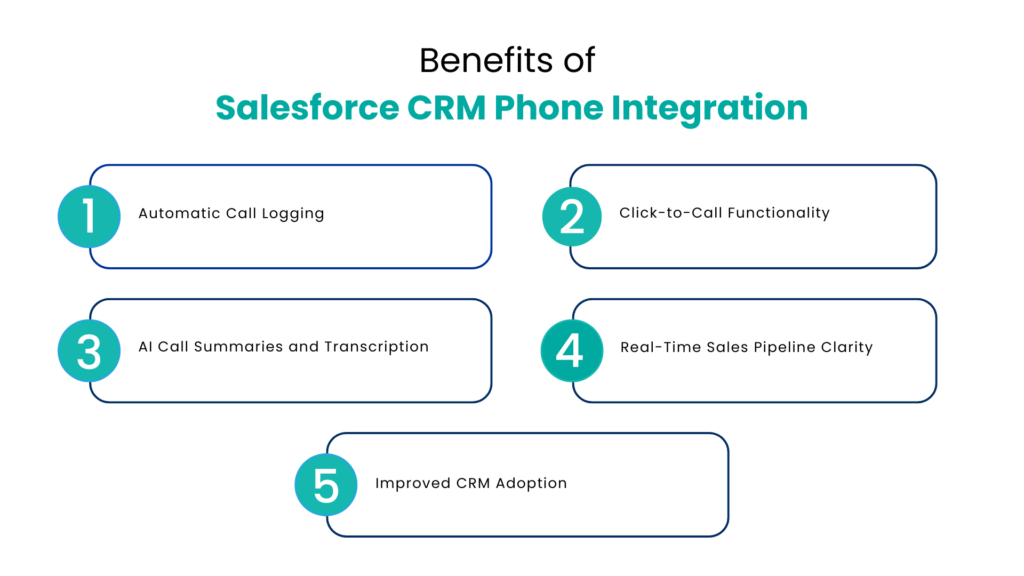
Connecting your phone system to Salesforce isn’t just a convenience upgrade. The operational impact is measurable.
Automatic Call Logging
Every call, inbound or outbound is captured and linked to the right record automatically. Duration, time, caller ID, disposition, and outcome are logged without rep involvement.
Click-to-Call Functionality
Reps can initiate calls directly from any phone number inside Salesforce. No switching apps, no manual dialing, no copy-paste errors. One click, immediate connection.
AI Call Summaries and Transcription
Modern telephone and VoIP CRM integrations now include AI-powered call intelligence. After each call, AI generates a structured summary: key topics discussed, action items, next steps, and sentiment analysis. This gets pushed directly into the Salesforce activity record.
Real-Time Sales Pipeline Clarity
With the automatic capture of call data, managers can see in real time the performance of the sales pipeline. How many calls were made by each rep? Which customers were contacted? Which opportunities need follow-up? Everything is answered via a single call data analysis.
Improved CRM Adoption
When Salesforce becomes easier, not harder to use, reps actually use it. Automated logging removes the friction that erodes adoption over time.
How Telephone and VoIP CRM Integrations Improve Productivity
Reducing Admin Work
By eliminating manual data entry, reps reclaim hours each week. That time goes directly into prospecting, follow-ups, and customer conversations the activities that generate revenue.
Unified Customer Communication
With a properly integrated phone system, every touchpoint like calls, emails, texts, meetings, appears in a single Salesforce timeline. Reps see the full history before they dial. Support agents know exactly what Sales promised. Customer success has context before the renewal conversation. For teams ready to take this further, AI-powered omnichannel for Salesforce eliminates silos across every department at once.
Workflow Automation Triggered by Calls
Advanced phone integration CRM setups use call outcomes to trigger Salesforce workflows automatically. A call logged as “interested” can automatically enroll the lead in a follow-up email sequence. A call marked “demo requested” can create a new Salesforce task and notify the AE. The phone call becomes a data event and data events power automation.
How CRM for Mobile Phone Integration Helps Remote Teams?
The modern sales team isn’t in one office. Reps work from home, travel between client sites, and take calls from three time zones. CRM for mobile phone integration ensures that location doesn’t compromise data quality.
With mobile-enabled phone integration, a rep who takes a call from their cell phone still has that call automatically logged in Salesforce. Mobile dialers let reps click-to-call from the Salesforce mobile app. Call recordings sync to the cloud, accessible from any device. Teams that also use messaging apps for customer communication can extend this further with WhatsApp Calling CRM solutions are increasingly part of how modern remote sales teams stay connected across channels.
For remote and hybrid sales teams, mobile CRM communication capability isn’t a luxury, it’s a requirement for operational consistency.
AI-Powered Automation and Automatic Call Logging
The most significant shift happening in Salesforce telephony integration right now is AI.
Where first-generation integrations automated the mechanics of logging, AI-powered systems now capture the substance of conversations. After a 30-minute discovery call, instead of a rep writing a paragraph of notes, they get:
- A structured call summary with key topics
- A list of identified action items
- Next-step recommendations based on conversation signals
- Sentiment analysis flagging high-interest or at-risk accounts
- Keyword alerts when competitors, pricing, or objections were mentioned
This level of intelligence doesn’t just save time; it makes every Salesforce record more useful. Managers coaching a deal have actual conversation data to work with. Reps preparing for a follow-up call have full context in seconds.
AI-powered CRM communication is no longer a premium feature for enterprise teams. It’s becoming the baseline expectation for competitive sales organizations of any size.
Salesforce Communication Automation Future Trends
The future is bright, with more intelligence and automation and less manual effort needed. Here are some trends to be aware of:
- AI voice agents qualifying leads and passing on to a human agent, along with full handoff to salesforce
- Real-time coaching during calls with identification of objections and competitor references by AI during the conversation and not after
- Predictive scoring of conversations and engagements taking into consideration sentiment analysis and deal size
- Omnichannel communications in Salesforce that include phone calls, emails, LinkedIn messages, and recordings of meetings
- Compliance automation with call recording consents managed by AI
Conclusion
Salesforce teams that still rely on reps to self-report call activity are working against their own data building pipelines on incomplete records, making forecast decisions on guesswork, and burning out their best sellers on admin work that adds zero value to the customer relationship.
Phone integration CRM closes that gap permanently. When your VoIP system and Salesforce talk to each other in real time, every call becomes a clean data point automatically logged, AI-summarized, and linked to the right record before the rep has even hung up. The pipeline reflects reality. The manager has visibility. The rep has time to actually sell.
Whether you’re running a lean SMB team on a cloud-based VoIP system or managing an enterprise sales org with hundreds of Salesforce licenses, the operational case is the same: connected phone and CRM infrastructure isn’t a nice-to-have anymore. It’s the baseline for running a competitive, data-driven sales team.
The technology is ready. The ROI is documented. The only question left is how many calls your team will log manually before making the switch.
FAQs
What is phone integration CRM?
CRM for phone integration connects your telephone or VoIP system to your CRM platform so that calls are automatically logged, recorded, and linked to the correct customer records eliminating manual data entry.
How does Phone Integration take place on Salesforce CRM?
The phone integration can be achieved by two ways – either through the built-in Open CTI from Salesforce or using other connectors that integrate the calling function directly into Salesforce. All incoming and outgoing calls are tracked within Salesforce automatically.
Is Salesforce phone integration possible for a small business?
Yes. Cloud-based VoIP phone service for small businesses have out-of-the-box integrations with Salesforce built-in as part of subscription plans available at cost-effective per-seat pricing.
Is phone integration in Salesforce suitable for remote sales teams?
Definitely. Mobile phone integration enables remote representatives to place and take calls using their personal phone devices while still ensuring calls are tracked in Salesforce.
How does artificial intelligence enhance telephone and VoIP integrations in Salesforce?
It brings about call transcriptions, structure summary, sentiment analysis, keyword identification, as well as recommended next steps to turn any call log into a valuable data item in Salesforce.
For more insights, updates, and expert tips, follow us on LinkedIn.